
Journal entry
Understanding the Opus Usage Limit
How the limit is calculated, how it refills, and why the number of images you can generate stays the same month over month.
The excitement around V5 since launch has been great to see. We’ve also noticed a lot of people in the community poking at the new usage limits and subscription changes.
We wanted to put together something to clear up the confusion and answer those questions directly.
How does the Opus Usage Limit work?
The limit is based on the Anlas amount of a V5 generation, which means that if a generation would’ve cost less Anlas, the usage consumed by that image is also reduced. This directly reflects the compute cost of V5. If an image costs less for us to generate, then you also get the gain in terms of usage limit!
We have seen experiments on this with low-step generations, but we are not confident enough in the output quality to change the default settings or recommend low step values to users. If it works for your workflow, then that works for us!
The limit also regenerates continuously every minute. The values we show on the website make it easier to communicate how the continuous refill works, but in practice, you are always refilling.
How many images can I generate per month?
This is where we get into the math behind the limit. Before we start explaining this, one important fact:
The number of images remains the same month over month.
Assuming 4 weeks per month, you should have a “400% per month” usage limit, and this is the number that we’ll use to explain the maths. What we’re explaining here is the choices that we made to maintain that fact.
On the first month of the subscription
Upon purchasing a new subscription, you get 100% worth of the usage limit immediately; this is done because it wouldn’t make sense to buy a subscription and not have access to V5. However, to maintain the 400%/month limit, given we already gave 100%, we would only want to refill 300% over the rest of the month. This amounts to an ~11%/day refill speed.
To better represent this behavior, we’ll call the usage you have at the start of a subscription the “frontload”. At the first month of a subscription, your frontload is 100%.
On the second month of the subscription (30 days after)
We do not instantly refill you back to 100%; instead, we continuously refill 400% over the monthly period instead of 300%. This increases refill speed to ~14%/day (which aligns with the intent of the limit: to refill 100% worth of usage over a 7-day period; 100% / 7 days = 14.28%). Your refill speed remains ~14%/day for the rest of the months you’re subscribed; so it does not increase past ~14%/day.
On the first month of a re-subscription
Let’s assume you have canceled your subscription. Your usage limit remains ongoing for as long as your Opus subscription runs. Once the subscription expires, the usage limit is “locked” and can’t be used. However, it still refills in the background to the rate you had at the time of expiry. It would be unfair to our users to pause the refill.
Upon re-subscription, to prevent abuse, we consider the usage limit you had when your subscription expired PLUS the amount you refilled during the period between your expiry and your (possible) future re-subscription as a frontload.
This means that, depending on how many days you spend between your subscription expiring and your re-subscription, you’ll have different refill speeds for the first month. Assuming your subscription expired and you used all of your limit, which means you ended your subscription at 0% usage remaining:
| Days to Resubscribe | Rate |
|---|---|
| 0 days | ~14%/day |
| 1 day | ~14%/day |
| 2 days | ~13%/day |
| 3 days | ~13%/day |
| 4 days | ~12%/day |
| 5 days | ~12%/day |
| 6 days | ~11%/day |
| 7 days | ~11%/day |
| Beyond 7 days | ~11%/day |
If you wait 7+ days to resubscribe, you’d get the 100% usage limit back, which means 100% is frontloaded (as we “gave” that amount of usage over the weekly period without an active subscription attached).
Sidenote on the “fairness fix” made around V5 release
For users who had an Opus subscription at the time of V5 launch (2026-08-21), their renewal does not incur a refill speed increase. This is slightly different because we wanted to keep the system fair for everyone. For those users, their refill speed will increase 30 days after the V5 release date, which will be September 19th, 2026. New subscribers get their refill timing increased by 30 days from when the subscription starts.
Frequently asked questions
Why is there an Opus Usage Limit at all, and is it permanent?
NovelAI Diffusion V5 is more than twice as expensive for us to run as NovelAI Diffusion V4.5, so we either had to introduce a usage limit or roughly double the price of Opus, and we would much rather keep the price where it is. We also deliberately chose a bar that refills continuously instead of a weekly reset, so that you are never left locked out waiting for a particular day to come around.
Are prices going up, or is there a higher tier?
No, we are not raising prices. Opus stays at $25, and it is worth remembering that the 10,000 Anlas bundled with it would cost $14 on their own. There is no higher tier at the moment. Plenty of people have asked for one and we are genuinely looking at the options, but there is nothing we can announce at this time.
What models are affected by the Opus Usage Limits? In what cases do the limits apply? Does this also affect non-Opus users?
Opus Usage Limits apply when using our latest image generation model, NovelAI Diffusion V5 – all other models will remain unaffected with unlimited generations. More specifically, the usage limits apply to Opus Subscribers when generating images that consume no Anlas at a normal resolution and up to 28 steps. Higher resolutions and step counts consume Anlas, as they always have, and thus aren’t subject to any usage limit. Non-Opus users aren’t affected by this.
How does the Opus Usage Limit work?
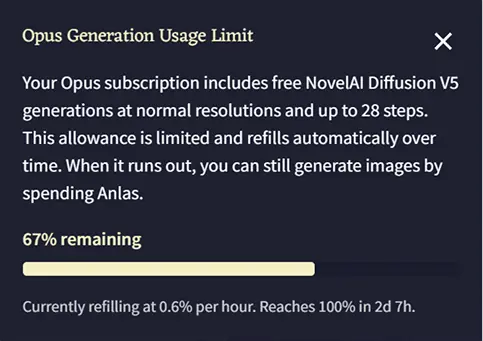
Think of your Opus usage limit like a rechargeable battery: every NovelAI Diffusion V5 generation (at normal resolutions and up to 28 steps) draws from your allowance, and that allowance recharges automatically, hour by hour, minute by minute, whether you’re generating or not. There are no fixed daily or monthly resets.
What are the refill rates? How long does a full recharge take from empty?
For your first 30 days the rate is ~11%/day. If you stay subscribed, it will become ~14%/day because you do not get an advance of 100%. The slower first month is deliberate: you start frontloaded at 100%, so the rate is reduced to keep the monthly total constant.
If you instead let your subscription expire and wait to resubscribe, your refill rate will vary depending on the amount of days that pass between your subscription running out and your re-subscription PLUS the amount of usage limit you had when your subscription expired.
Refilling a completely empty usage bar takes 9 days on a new subscription, and 7 days on continued subscriptions. For re-subscriptions it can vary from 9 to 7 days depending on your refill rate. The table below shows the different refill rates for users who re-subscribe, though keep in mind that the usage limit you have left at the time your subscription expires also influences this number.
| Days to Resubscribe | Rate |
|---|---|
| 0 to 1 days | ~14%/day |
| 2 to 3 days | ~13%/day |
| 4 to 5 days | ~12%/day |
| 6 or more days | ~11%/day |
Does my Opus generation bar refill instantly when my subscription renews, or does it only refill gradually?
Your Opus generation limit refills slowly and constantly, a bit at a time. It is not linked to your billing date. If you empty it right before your subscription renews, renewing does not instantly refill it. It just keeps filling up slowly, same as always.
If my subscription runs out, does the bar keep charging during that time or freeze until I resubscribe?
The bar will always refill, even while you’re unsubscribed. You just cannot use it while unsubscribed. Once you subscribe again you can use whatever built up. Resubscribing does not add anything extra on top.
Can I buy multiple subscriptions on different accounts?
No. Our system limits each identity to one active subscription. If you have multiple accounts, we can’t assist with any payment issues that may arise.
Will a busy day or weekend binge lock me out?
No. Usage starts recharging immediately after you spend it, so you’re never more than minutes away from generating again.
Where can I check my current charge and recharge speed?
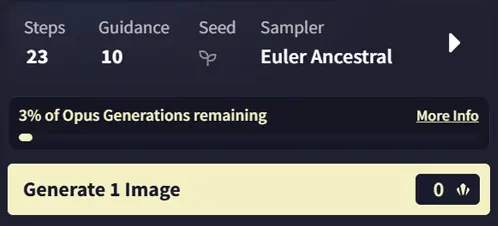
The Hamburger Menu has an Opus Usage Limit button, here it shows a bar with current charge, recharge speed, and time to full. You can also select the option to always display the bar here.
What happens if I hit zero?
If your usage limit ever runs out, you can keep generating images by using your available subscription Anlas or paid Anlas. As a reminder, Anlas generations are processed at the highest priority, so they remain the fastest way to generate on NovelAI.
How many V5 generations does the usage limit actually allow?
About 7,000 per month at 23 steps and normal resolution. Roughly 17 images per 1% of the bar, and the bar holds up to 100% = ~1,730 images. All published estimates assume 23 steps at 1 megapixel, which is the default; at 28 steps you get meaningfully fewer. 23 is the default value.
Does resolution or step count affect how fast I burn through it?
Both resolution and step count affect how much of your usage limit a generation consumes. Both also affect the quality of the output. Reducing both will save more usage, but it may also affect quality more noticeably. Since cost scales with the pixel count of your chosen resolution, lowering resolution tends to be a more effective way to save usage than lowering step count.
I’ve heard about the % going over 100%, what was that?
That was a one-off celebration bonus provided to all current Opus subscribers on the 22nd of August 2026.
Conclusion
Thank you for reading! We hope this helps you understand the usage limits. We continue to listen to feedback to improve the NovelAI experience for our community.